2026-09-04 · 相机内参 · camera intrinsics · 明日清单第 4 项 / tomorrow item 4
棋盘格:下载、打印、拍摄
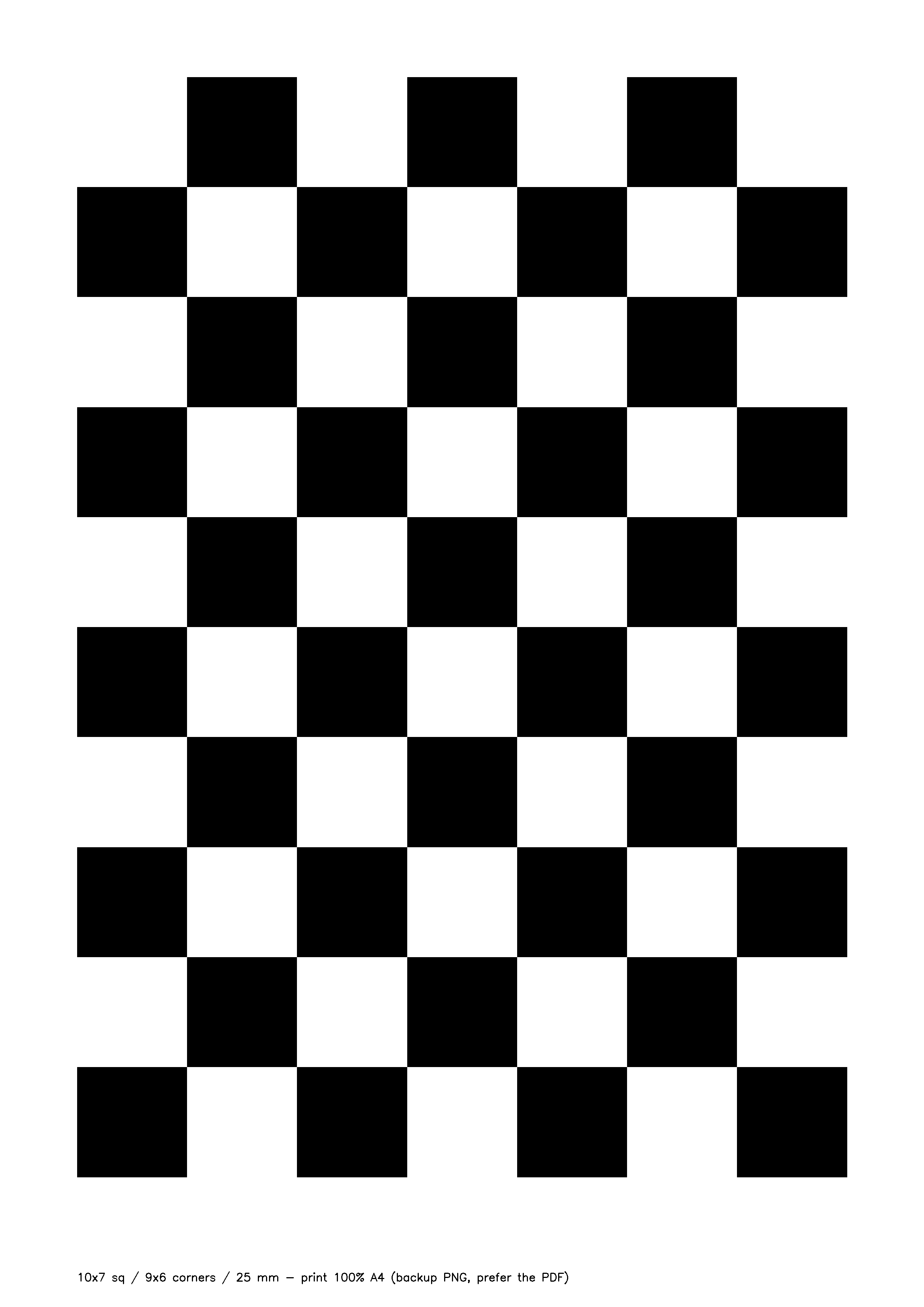
A4 一张,10×7 格、内角点 9×6、方格 25.0 mm。矢量 PDF,按 100% 打印尺寸就是准的。
⬇ checkerboard-9x6-25mm-A4.pdf首选 · 矢量 PDF · 2.5 KB · A4 纵向 · 底部自带 100 mm 校验尺条
Preferred · vector PDF · A4 portrait · 100 mm check ruler at the bottom ⬇ 备用 PNG(300 dpi)只在打印店不收 PDF 时用;打印时同样选「实际大小」
Backup only; also print at "actual size"
Preferred · vector PDF · A4 portrait · 100 mm check ruler at the bottom ⬇ 备用 PNG(300 dpi)只在打印店不收 PDF 时用;打印时同样选「实际大小」
Backup only; also print at "actual size"
打印说明(打印店照这个说)
| 项目 | 要求 |
|---|---|
| 纸张 | A4 纵向,普通白纸即可,不要光面相纸(反光会让角点检测失败) |
| 缩放 | 100% / 实际大小。不要勾「适应页面 / fit to page / 缩放到可打印区域」 |
| 颜色 | 黑白即可,选最高质量 / 最深黑 |
| 份数 | 1 张够用,建议印 2 张备用 |
印完必须做的一件事:拿尺子量。
① 页面底部有一条 0–100 mm 尺条,用钢尺量:应该正好 100 mm。
② 再量连续 4 个方格的总长:应该是 100.0 mm(单格 25.0 mm)。
③ 把实测值告诉远程,例如「4 格 = 99.2 mm → 单格 24.8 mm」。标定用的是实测值,不是 25;差 1 mm 就是 4% 的尺度误差,Z 轴距离会整体偏 4%。
① 页面底部有一条 0–100 mm 尺条,用钢尺量:应该正好 100 mm。
② 再量连续 4 个方格的总长:应该是 100.0 mm(单格 25.0 mm)。
③ 把实测值告诉远程,例如「4 格 = 99.2 mm → 单格 24.8 mm」。标定用的是实测值,不是 25;差 1 mm 就是 4% 的尺度误差,Z 轴距离会整体偏 4%。
贴板。用胶棒或双面胶把整张平贴在硬纸板 / 亚克力 / 硬封面本子上,四角压实。
卷边、鼓包、折痕都会让标定悄悄跑偏,而且事后从数据里看不出来。打印店如果能过塑(哑光)更好,亮面过塑不要。
怎么拍(约 20 分钟,头相机)
⚠ 分辨率必须写死 1280×720,全部照片同一个分辨率(2026-09-06 补):
这台相机的三个模式视场并不相同——原生读出 848×480,
生产里头相机跑的是
2026-09-04 那次标在 640×480 上——三个模式里唯一被裁边的那个——于是那组内参不能缩到生产分辨率,误差 32%。
混分辨率 = 整套作废,而且不会报错。
这台相机的三个模式视场并不相同——原生读出 848×480,
640×480 是它的居中横向裁切(水平视场 69.7°),
424×240 是 2× binning(85.4°),1280×720 与 424×240 同视场(2026-09-06 实测尺度 s=0.3330,等视场理论值 0.3312)。生产里头相机跑的是
424×240,所以标定要标在同视场的模式上,标完按宽度比例缩过去才成立。2026-09-04 那次标在 640×480 上——三个模式里唯一被裁边的那个——于是那组内参不能缩到生产分辨率,误差 32%。
混分辨率 = 整套作废,而且不会报错。
- 头先到
trial预置位并保持不动,全程不许碰头。内参和头的姿态无关,但后面手眼标定要用同一批图。 - 手持标定板在相机前变换姿态,拍 15–20 张,每张板子完整入画、不糊、不反光。
- 覆盖要全:画面中心 + 四个角;近(板占画面 1/2)和远(占 1/5);正对 + 明显倾斜(左右俯仰各 30°–45°)。
- 倾斜是关键:只拍正对解不出畸变系数,fx/fy 也会不稳。
- 拍完把文件夹和「实测方格边长 = XX.X mm」一起发给远程。
做完的样子:一个文件夹 15–20 张头相机原图(不要压缩转发,原分辨率),外加一句「4 格实测 = XX.X mm」。
为什么是这个规格
明日清单第 4 项定的就是 10×7 格 / 内角点 9×6 / 25 mm / A4。9×6 是 OpenCV 教程默认尺寸,cv2.findChessboardCorners(img, (9,6)) 直接可用;
7 列 × 25 mm = 175 mm、10 行 × 25 mm = 250 mm,A4(210×297)纵向刚好放下,四周留白 17.5 / 23.5 mm。
这个 PDF 是纯矢量手写的,页面尺寸 595.276×841.89 pt(A4),已在本机渲染后用 OpenCV 找全 54 个角点,角点间距 25.0 mm。
Print instructions (say this to the print shop)
| Item | Requirement |
|---|---|
| Paper | A4 portrait, plain white paper. No glossy photo paper (glare kills corner detection) |
| Scale | 100% / actual size. Do not tick "fit to page" / "scale to printable area" |
| Colour | Black and white is fine; highest quality / darkest black |
| Copies | 1 is enough; 2 recommended as a spare |
After printing, measure it.
① The 0–100 mm ruler bar at the bottom of the page should read exactly 100 mm with a steel ruler.
② Measure 4 consecutive squares: should be 100.0 mm (25.0 mm per square).
③ Report the measured value, e.g. "4 squares = 99.2 mm → 24.8 mm per square". Calibration uses the measured value, not 25. A 1 mm error is a 4% scale error, and every Z distance will be off by 4%.
① The 0–100 mm ruler bar at the bottom of the page should read exactly 100 mm with a steel ruler.
② Measure 4 consecutive squares: should be 100.0 mm (25.0 mm per square).
③ Report the measured value, e.g. "4 squares = 99.2 mm → 24.8 mm per square". Calibration uses the measured value, not 25. A 1 mm error is a 4% scale error, and every Z distance will be off by 4%.
Mount it flat. Glue the whole sheet to stiff cardboard / acrylic / a hardcover notebook, press the corners down.
Curl, bubbles and creases silently bias the calibration and cannot be seen in the data afterwards. Matte lamination is a plus; glossy lamination is not.
How to shoot (about 20 minutes, head camera)
⚠ Fix the resolution at 1280×720, and shoot every image at the same one (added 2026-09-06):
This camera's three modes do not share a field of view — native readout is 848×480,
Production runs the head camera at
The 2026-09-04 session was shot at 640×480 — the one cropped mode of the three — so those intrinsics cannot be scaled to the production resolution; the error is 32%.
Mixing resolutions voids the whole set, silently.
This camera's three modes do not share a field of view — native readout is 848×480,
640×480 is a
centred horizontal crop of it (69.7° HFOV), 424×240 is 2× binning (85.4°), and 1280×720
shares its field of view with 424×240 (measured 2026-09-06: scale s=0.3330 against 0.3312 for an identical FOV).Production runs the head camera at
424×240, so the calibration must be shot in a mode with the same field of
view; only then is scaling the intrinsics by width ratio valid.The 2026-09-04 session was shot at 640×480 — the one cropped mode of the three — so those intrinsics cannot be scaled to the production resolution; the error is 32%.
Mixing resolutions voids the whole set, silently.
- Move the head to the
trialpreset first and do not touch it again. Intrinsics do not depend on head pose, but the hand-eye step later reuses these images. - Hold the board in front of the camera and take 15–20 shots, board fully in frame, sharp, no glare.
- Cover everything: centre + all four corners; near (board fills 1/2 of the frame) and far (1/5); facing + clearly tilted (30°–45° yaw and pitch).
- Tilt is the key: frontal-only shots cannot solve distortion and fx/fy will be unstable.
- Send the folder together with "measured square size = XX.X mm".
Done looks like: one folder with 15–20 original head-camera frames (full resolution, not re-compressed), plus one line "4 squares measured = XX.X mm".
Why this spec
Tomorrow's list item 4 specifies 10×7 squares / 9×6 inner corners / 25 mm / A4. 9×6 is the OpenCV tutorial default, so cv2.findChessboardCorners(img, (9,6)) works as is.
7 × 25 mm = 175 mm and 10 × 25 mm = 250 mm fit A4 portrait (210×297) with 17.5 / 23.5 mm margins.
The PDF is hand-written vector, page size 595.276×841.89 pt (A4); rendered locally, OpenCV found all 54 corners at 25.0 mm pitch.